October 10, 2026
Laptop Table Design for Home: 6 Practical Ideas for Different Spaces

Introduction
Finding a laptop table design for home starts with more than choosing a style. The right arrangement depends on how much room you have, where you usually use your laptop, and what you want within reach while you work or study. A compact table beside the sofa may be enough for occasional tasks, while a dedicated nook can give frequently used items a place to live.
These six ideas cover different needs: a sofa-side table, a fold-down wall desk, a rolling surface, a bedside nook, a convertible dining or console setup, and a dedicated workspace with vertical organization. Treat them as adaptable layouts, not prescriptions with one-size-fits-all measurements. Consider your room and routine, then adjust the details to suit both.
Start with the Room, the Task, and the Available Space
Before choosing a table, picture where you will use it and what you will do there. A surface for checking messages or a short task may need a different arrangement from a spot used regularly for work or study. Consider whether you will move it between rooms or leave it in one place.
Measure the intended area, including room to sit and use the laptop. Compare it with the table, then check that your laptop, charger, and frequently used items fit without crowding the surface. Consider whether doors, drawers, or nearby furniture could limit access.
Think about stability and setup. The surface should feel steady for your tasks. Check how the charger will reach an outlet and whether its cable crosses a walkway or seating area. Decide whether you need a drawer, shelf, or nearby storage, or prefer a clear top.
Let the room guide the style: a compact side table may suit a sofa corner, while a fold-down or rolling design offers flexibility. A fixed table may suit a dedicated spot. Start with a layout that fits your space and routine, rather than choosing a design and making it work afterward.
1. A Compact Side Table Beside a Sofa
A compact side table can create a laptop spot near seating you already use. It keeps the device and a few essentials close without adding a full desk, making it practical for occasional browsing, reading, or short tasks in a shared living space.
Check the table’s height and position against the sofa before settling on a layout. Make sure the laptop can sit where it suits your intended use, while leaving room to sit comfortably and move around the furniture. Reserve tabletop space for the laptop and items you reach for regularly.
A lower shelf or storage compartment can hold a charger, notebook, or other accessories, leaving the top more open. In a sofa corner, for example, place the table beside the arm and keep small items in a basket or on the shelf below. This keeps the arrangement contained without turning the seating area into an office.
2. A Fold-Down Wall Desk for a Small Room
When floor space is limited, a fold-down wall desk creates a laptop surface that can be put away after use.
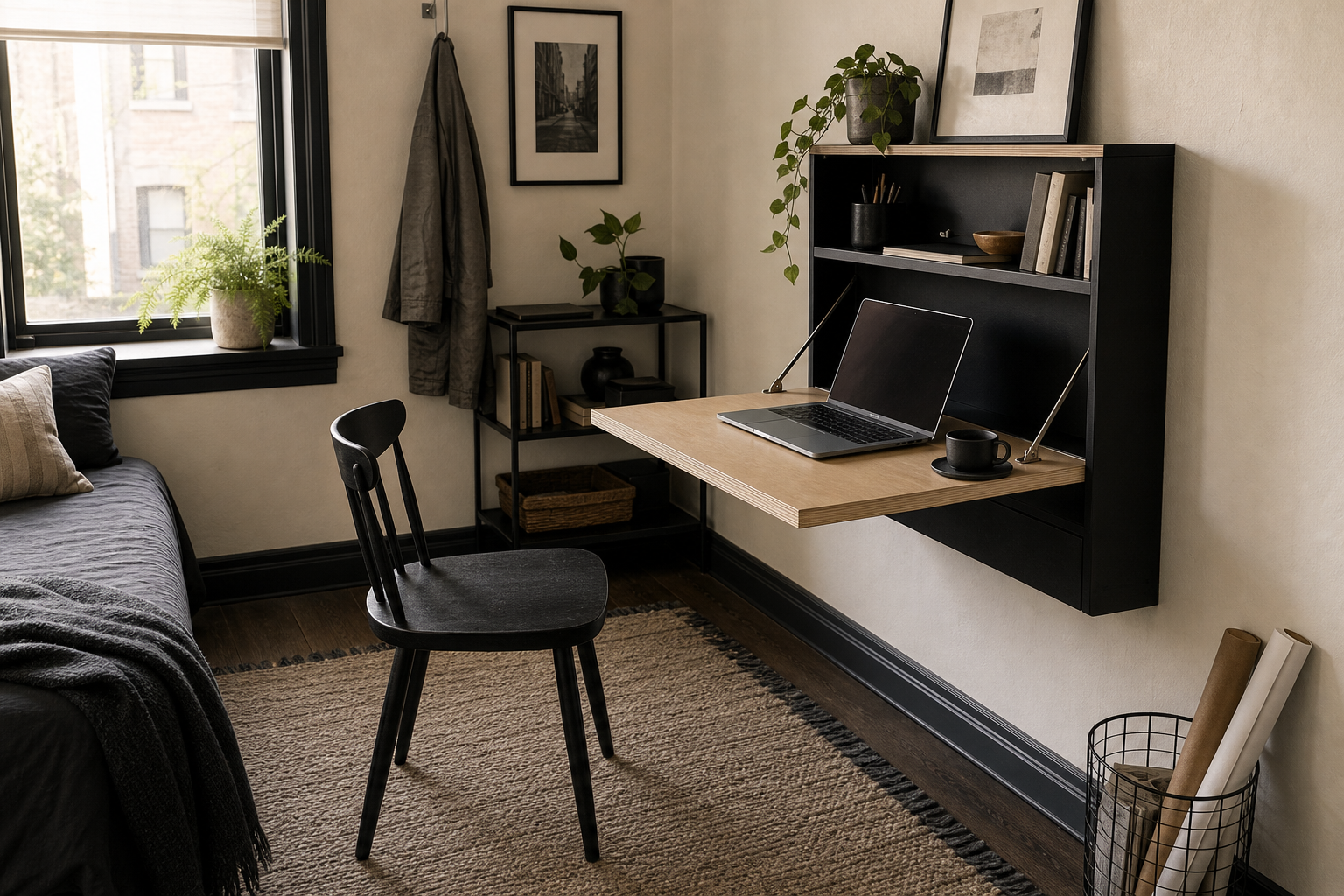
It suits a small room where a permanent desk would take up too much space, freeing the area when work or study is finished.
Before choosing one, assess the wall, installation requirements, and intended load, including the laptop and anything else you plan to place there. Follow the product instructions, and do not assume every wall or mounting method is suitable. Seek installation advice if you are unsure.
Plan the rest of the setup too. Keep a chair nearby and choose a consistent place for the charger and other accessories. A small shelf or organizer can keep the open surface clear. For another point of comparison, see this guide to foldable laptop table types.
3. A Rolling Laptop Table That Can Move Between Rooms
A rolling laptop table can follow your routine: keep it beside the sofa for a focused task, then move it to another seating area when needed. Before choosing one, consider whether its size suits the spaces where you plan to use it and whether there is a clear route between rooms. Doorways, furniture, and floor transitions can affect how easily it moves.
Treat wheel locks and surface stability as features to check rather than assume. If the table will hold a laptop while you type, consider whether its top feels steady in the position you intend to use. Look at how the power cable will reach an outlet, too, and whether it can be arranged without trailing across a walkway.
A lower shelf or small organizer can keep a charger, notebook, and other everyday items together as the table travels. Keep the load manageable so moving the setup remains simple.
4. A Bedside Laptop Nook for Occasional Use
For a short task, a small bedside surface or nearby table can provide a convenient place to open a laptop without creating a separate work area. This arrangement may suit a bedroom where space is limited or where you only need a surface for occasional use. Choose a spot that does not interfere with the table’s usual role or make it awkward to reach other bedroom essentials.
Keep charging cables tidy and personal items grouped in a tray or small container. That makes it easier to clear the surface when it is time to use it for something else, such as holding a book, lamp, or bedtime essentials. If the table is shared, a simple place to store the laptop and accessories can help keep the room orderly.
A bedside nook is one possible home layout, not a universal work solution. Think about the tasks you actually do and whether this setup feels practical for them. If it does not, use a different surface for longer or more involved work.
5. A Convertible Dining or Console Table Setup
An existing dining table, console, or other suitable household surface can become a temporary laptop station when you do not want to add a dedicated desk. Choose a spot where the laptop can sit without taking over the surface’s main purpose. A dining table may work for a scheduled work period, while a console could suit a brief task if it has enough usable space.
Gather the essentials in a tray or small container: for example, a charger, notebook, and pen. Store the container nearby when the work session ends, or return it to a designated storage spot. This makes it easier to set up again without leaving accessories scattered across the room.
Keep the arrangement temporary if the surface serves other people or household activities. Before you begin, decide where the work items will go afterward and leave the table ready for its usual use. If accessories start accumulating, reduce the kit to what you need rather than letting the laptop setup become permanent clutter.
6. A Dedicated Laptop Nook with Vertical Organization
If you want a more permanent spot, pair a laptop table with a wall organizer for small workspace items. The table remains the laptop’s support surface; the wall organizer can keep compatible, lightweight accessories and frequently used supplies nearby without crowding the tabletop. Arrange items within easy reach, and keep the surface clear enough for the laptop and the task at hand.
A pegboard can hold or display suitable accessories, but it is not a laptop stand. Check that any organizer and attachments are appropriate for the items you plan to place on them, and follow installation guidance for the wall and mounting system.
SKADEAS publishes this article and sells the organizers mentioned, including modular pegboards. Check the product details and current availability directly before choosing a board or accessories. Get info about SKADEAS’s organizer options.
Make the Setup Feel Cohesive and Easy to Use
A laptop table can fit naturally into a room when its finish and accessories complement what is already there. Echo a nearby wood tone, metal detail, or neutral color instead of introducing several new finishes. Keep decoration simple: a lamp or small plant can add character, but leave enough of the surface clear for the laptop and anything else you use while working.
Give everyday items a planned home. Keep a charger, notebook, and headphones close if they are part of your routine; store supplies you rarely use elsewhere. A tray, drawer, or small basket can gather loose items without letting them spread across the table. For a dedicated nook, nearby shelves or vertical storage can hold extras while keeping the work surface open.
Consider cable routing when deciding where the table goes. Keep cords together and guide them toward an outlet without crossing a walkway or becoming a tangle around the furniture. Frequently used items should be easy to reach, while occasional accessories can stay tucked away. The aim is not a perfectly styled display, but a setup that feels at home in the room and is simple to reset after each use.
Choose the Laptop Table Design That Fits Your Home
The right laptop table design for home depends on where you plan to use it, how often it will be needed, and whether you value flexibility or a dedicated station. A compact side table or rolling option can suit changing routines, while a wall desk or organized nook can make better use of a consistent spot. An existing dining or console table may be enough if you prefer not to add another piece of furniture.
Before choosing, measure the area you have in mind and list the items you want nearby. Compare those needs with the six layouts, then consider how easily the setup can be stored, moved, or kept tidy. If pegboard-based workspace organization is part of your plan, get info from SKADEAS.